
Kitchen Display System for Restaurants by BytePOS
The BytePOS kitchen display system replaces paper tickets with screens, so the kitchen sees every order clearly and service moves faster.
RESTAURANT AND RETAIL POS BY BYTEPOS
BytePOS Kitchen Display System for Restaurants
All Orders. One KDS
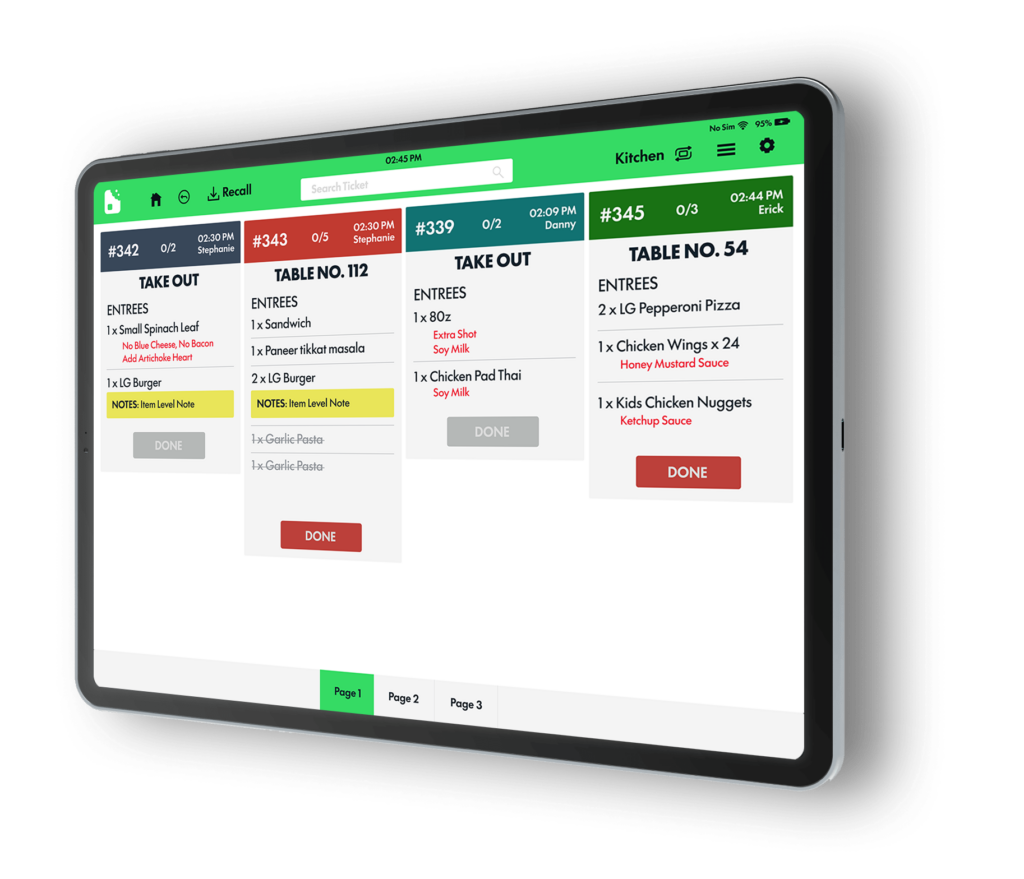
Keep the line organized and food going out on time. Orders from the POS, your website and mobile apps appear in real time on color-coded tickets.
A Calmer, More Organized Back of House
- Easy to use
- Reduce waiting time
- Meal pacing
- Cook times
- Greater convenience for staff
- Increase order accuracy
- Course manager
Cooks track and manage orders directly on the kitchen screens. Orders are sequenced by how long they take to prepare.
What the BytePOS KDS Includes
- Tickets Change Color as Time Passes
- Consolidated View
- Sound Notifications
- User Friendly
- KDS Auto Bump
- Order Printing
- Countdown
- Modifiers
How a kitchen display system speeds up your kitchen
Paper tickets get lost, smudged and read out of order. A kitchen display system (KDS) replaces them with screens that show every order the moment it is placed, whether it comes from the POS, your website or a mobile app. BytePOS KDS is part of the BytePOS all-in-one POS, so orders, modifiers and changes reach the kitchen instantly, with no re-typing.
The result is shorter ticket times, fewer remakes and a calmer kitchen during the rush.
Color-coded tickets by elapsed time
Tickets change color as they age, so cooks can see at a glance which orders are running late and need attention first.
Consolidated view
See how many of each item are pending across all open orders, making it easy to batch prep and keep the line moving.
Course manager and meal pacing
Hold and fire courses so appetizers, mains and desserts come out in the right order and at the right time.
Auto bump and countdown timers
Track cook times with countdowns and let completed orders clear automatically, keeping the screen focused on what comes next.
Clear modifiers and sound alerts
Modifiers and special requests stand out on every ticket, and sound notifications let the team know the moment a new order arrives.
Order printing when you need it
Keep a printer for expo or packaging and print any order directly from the KDS, so screens and paper work together.
KDS vs. kitchen printers
A kitchen printer only tells cooks what to make. A KDS also shows when to make it, how long it has been waiting and what changed. Because BytePOS KDS runs on the same platform as your POS, online ordering and self-order kiosks, you also get prep-time data that helps you plan staffing and spot bottlenecks.
Kitchen display system FAQ
What is a KDS in a restaurant?
A kitchen display system is a screen in the kitchen that shows incoming orders from the POS and other channels in real time, replacing paper tickets. Cooks can see, prioritize and complete orders right on the screen.
Does BytePOS KDS work with online orders?
Yes. Orders from your POS, website and mobile apps appear on the same KDS, color-coded and prioritized, so the kitchen works from one queue.
Can I use more than one KDS screen?
Yes. You can route orders by station, such as grill, fryer or bar, so each team only sees the items it prepares.
Can I still print kitchen tickets?
Yes. BytePOS supports order printing, so you can combine screens and printers in whatever way works best for your kitchen.